In recent years, smart homes have steadily moved from niche innovation to a practical part of everyday living. Once considered a premium upgrade, smart home features are now becoming common in apartments, villas, and townhouses across the UAE and the Gulf region. Today, building a smart home is less about showcasing technology and more about enhancing comfort, improving energy efficiency, and making daily routines more convenient.
As smart home automation devices become more affordable and widely available, more people are starting to realize that a smart home is not just a luxury. It is becoming the default expectation, especially in cities across the UAE, where innovation is embraced as part of modern living.
But what exactly is a smart home? What smart home automation systems should you consider? And is it worth the investment? Let us dive into everything you need to know about smart homes, from how they work to how you can set one up.
What Is a Smart Home?
A smart home is a connected living space where devices are automated and controlled remotely using apps, voice, or sensors. This includes lighting, climate, security, air quality, and entertainment.
The backbone of any smart home automation solutions is the Internet of Things (IoT) devices. These are physical objects embedded with sensors, software, and connectivity that let them collect and exchange data. In a smart home, IoT devices include everything from a smart thermostat that adjusts based on your preferences to smart locks that let you control your doors from anywhere.
Smart homes can also include smart TVs, smart lighting systems, smart plugs, security cameras, and even smart appliances like coffee makers and refrigerators. These devices communicate through wireless protocols like Wi-Fi and Zigbee and are often controlled through a smart home app or a central hub.
How Does a Smart Home System Work?
A smart home system works by connecting smart home devices through a central platform that allows them to communicate, automate tasks, and be controlled from a single interface. Whether you are using Google Home or Amazon Echo, or a proprietary system offered by a smart home company like Syncrow, your system works by communicating with your devices and allowing you to control smart devices through a single interface.
For example, you can schedule your smart thermostat to lower the temperature when you are away, or set your smart lighting to turn on automatically at sunset. A smart lock can notify you when someone enters your home, and a smart speaker can play your favorite music or answer your questions with a simple voice command.
The goal is to manage various aspects of the home from one centralized platform, bringing home automation to life with convenience and efficiency.
Technologies Used in Smart Homes
Smart home systems rely on a variety of communication technologies, including:
- Wi-Fi: Common in most homes, good for high-data tasks like video streaming on smart TVs or security cameras.
- Zigbee and Z-Wave: Popular low-power mesh networks ideal for smart lighting systems, smart locks, and sensors.
- Bluetooth: Often used for short-range communication with smart speakers, smart bulbs, and some appliances.
- Thread: A newer low-power mesh network that is growing in popularity due to its security and scalability.
Many smart homes use a home hub or gateway to manage communication between devices. This hub often integrates with a home app that you can access from your smartphone.
Components of a Smart Home System
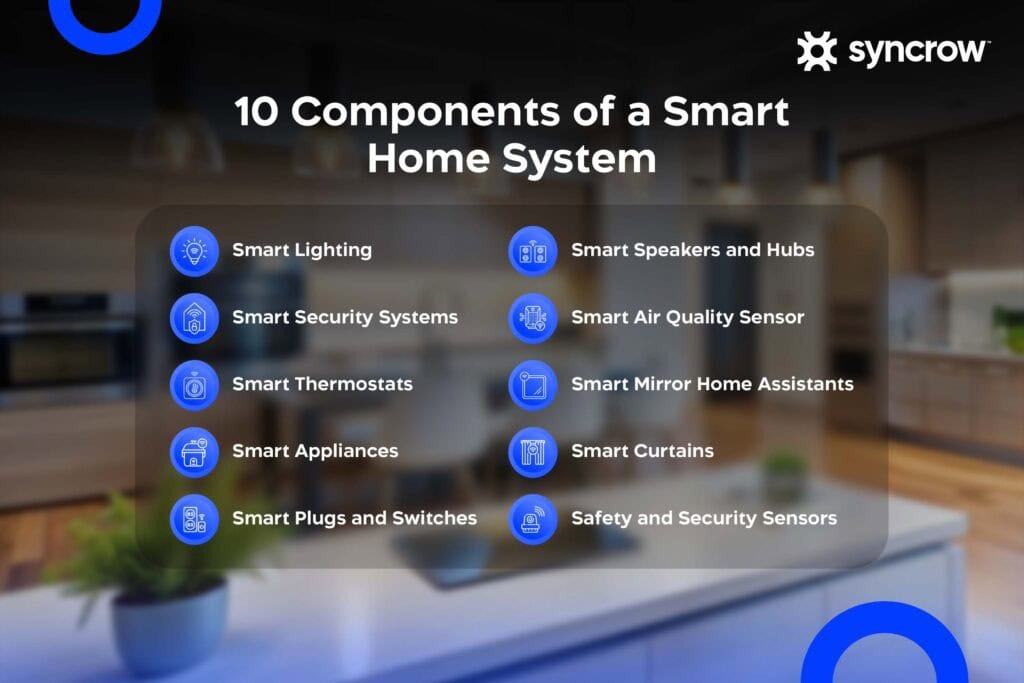
Smart home devices include lighting, security systems, thermostats, appliances, and sensors that work together to automate and manage different aspects of a home. Here are some key components of a smart home:
1. Smart lighting
2. Smart security systems
3. Smart thermostats
4. Smart appliances
5. Smart plugs and switches
6. Smart speakers and hubs
7. Smart air quality sensor
8. Smart mirror home assistants
9. Smart curtains
10. Safety and security sensors
1. Smart Lighting
Includes smart light bulbs, dimmers, and smart lighting systems that let you adjust lighting remotely or on a schedule. They can even change color to match your mood or environment. Smart lighting systems cab be connected to scenes to adjust lighting based on the activated scenes.
2. Smart Security Systems
These often include smart locks, smart security cameras, smart motion sensors, and door/window sensors. They allow you to monitor your home in real-time, receive alerts for suspicious activity, and grant temporary access when needed.
3. Smart Thermostats
A smart thermostat allows you to schedule temperature settings based on your routine and preferences, helping you save energy while maintaining comfort. Some models even use geofencing to adjust settings automatically when you are approaching or leaving home.
4. Smart Appliances
This covers a wide range of home appliances like smart coffee makers, refrigerators, ovens, and even washing machines. These smart home appliances can be programmed to run on a schedule or respond to remote commands.
5. Smart Plugs and Switches
These allow you to make ‘dumb’ devices smarter by controlling their power remotely. They are a great entry point for those starting their smart home journey. Smart plugs allow you to control power consumption of each device more effectively.
6. Smart Speakers and Hubs
Devices like Amazon Echo or Google Home act as both smart speakers and home hubs, letting you control your home via voice and coordinate all smart devices and appliances.
7. Smart Air Quality Sensor
These devices are gaining popularity as more homeowners prioritize wellness and indoor environmental quality. A smart air quality sensor monitors pollutants, humidity, CO₂ levels, and particulate matter (PM2.5) in real time. It can alert you when air quality drops and even integrate with smart appliances like air purifiers or humidifiers to automatically adjust and improve indoor conditions.
8. Smart Mirror Home Assistants
Smart mirror home assistants combine display technology with smart functionality, transforming traditional mirrors into interactive control panels. These mirrors can show real-time information such as weather updates, time, calendar reminders, and even health metrics while still functioning as regular mirrors.
In a smart home setup, they can integrate with other devices to control lighting, play music, or display security camera feeds. In bathrooms and bedrooms, they enhance convenience by allowing users to access essential information and control their environment during daily routines without needing a phone or additional screens.
9. Smart Curtains
Smart curtains automate the opening and closing of window coverings based on schedules, sunlight levels, or user commands. They can be controlled through mobile apps, voice assistants, or integrated into automation routines within a smart home system.
Beyond convenience, smart curtains play a key role in energy efficiency. By automatically closing during peak sunlight hours, they reduce indoor heat gain and lower air conditioning usage. In the evening, they can open to allow natural light, helping balance comfort, privacy, and energy consumption throughout the day.
10. Safety and Security Sensors
Safety and security sensors are essential components of a complete smart home system, designed to protect both occupants and property. These sensors continuously monitor environmental conditions and provide real-time alerts when risks are detected.
Smoke and gas sensors can instantly notify homeowners of potential fire hazards or gas leaks, while water leak sensors help prevent costly damage by detecting leaks early. Door and window sensors enhance security by alerting users when entry points are opened unexpectedly. When integrated into a smart home system, these sensors can also trigger automated actions, such as shutting off water supply or activating alarms, ensuring faster response and improved safety.
Smart Home Automation Protocols You Should Know About
Smart home devices rely on different communication protocols to connect and operate efficiently. Understanding these protocols is important when building a reliable and scalable smart home system, as compatibility between devices depends heavily on how they communicate. Check the essential smart home automation protocols:
- Wi-Fi
- Bluetooth
- Zigbee
- Z-Wave
- Thread
- Matter
Wi-Fi
Wi-Fi is the most widely used protocol in smart home automation systems due to its availability in almost every household. It supports high-bandwidth applications such as security cameras and smart TVs. However, it consumes more power compared to other communication protocols.
Bluetooth
Bluetooth is ideal for short-range communication and is commonly used for direct device control, such as connecting smartphones to smart speakers or bulbs. It is energy-efficient but limited in range and scalability.
Zigbee
Zigbee is a low-power, mesh-based protocol designed for smart home environments. Devices communicate with each other to extend network coverage, making it highly reliable for lighting systems, sensors, and automation.
Z-Wave
Z-Wave is another mesh network protocol similar to Zigbee but operates on a different frequency, reducing interference with Wi-Fi networks. It is known for strong reliability and is widely used in security systems and home automation setups.
Thread
Thread is a modern mesh networking protocol designed for speed, security, and scalability. It allows devices to communicate directly without relying heavily on a central hub, improving system responsiveness and reliability.
Matter
Matter is a unified smart home standard developed to improve compatibility across brands and ecosystems. It ensures that devices from different manufacturers can work together seamlessly, reducing integration challenges and simplifying smart home adoption.
Energy Savings Tips for Smart Homes in UAE
Smart homes are not only about convenience, they also play a major role in reducing energy consumption when used effectively. By combining automation with data-driven control, homeowners can significantly lower utility costs to get the best benefits of smart home automation.
- Optimize ac thermostat settings.
- Automate lighting with motion sensors.
- Eliminate standby power with smart plugs.
- Monitor real-time energy consumption.
- Use smart curtains to reduce heat gain.
- Automate devices based on presence.
- Schedule water heating and cooling.
Optimize AC Thermostat Settings
Adjust temperature settings based on occupancy and time of day. Smart thermostats can automatically reduce cooling when the home is empty and restore comfort before occupants return.
Automate Lighting with Motion Sensors
Motion sensors ensure lights are only active when needed whether when people are in or for security reasons, eliminating unnecessary energy usage in empty rooms or low-traffic areas.
Eliminate Standby Power with Smart Plugs
Smart plugs can cut power to devices that consume electricity even when turned off, such as TVs and chargers, reducing hidden energy waste. Smart plugs work based on schedule as well so you can run devices when needed.
Monitor Real-Time Energy Consumption
Energy monitoring tools provide visibility into electricity usage, helping homeowners identify high-consumption devices and adjust usage patterns accordingly.
Use Smart Curtains to Reduce Heat Gain
Automating curtains based on sunlight exposure helps maintain indoor temperature, reducing reliance on air conditioning systems and keeping balanced indoor environment.
Automate Devices Based on Presence
Presence detection allows systems to activate or deactivate devices automatically when users enter or leave the home, optimizing energy use without manual intervention.
Schedule Water Heating and Cooling
Smart scheduling ensures water heaters and cooling systems operate only when needed, avoiding unnecessary energy consumption during idle periods.
Smart Home vs Traditional Homes
Traditional homes rely on manual control of lighting, climate, and security systems, while smart homes introduce automation, connectivity, and centralized management. This shift transforms how homeowners interact with their spaces, making daily operations more efficient and responsive with professional smart home automation installation.
| Feature | Smart Home | Traditional Home |
| Control | Remote, app, and voice control | Manual switches and controls |
| Energy Efficiency | Optimized through automation and data | Higher energy consumption |
| Security | Real-time monitoring and alerts | Basic locks and alarms |
| Convenience | Automated routines and scheduling | Requires manual operation |
| Integration | Devices work together seamlessly | Systems operate independently |
| Scalability | Easily expandable | Limited upgrade flexibility |
Pros and Cons of Smart Homes
Smart home automation comes with great pros that enhance life quality, convenience, and comfort. However, some cons could be included but they totally rely on your perspective, as most people may not even consider them.
Benefits of a Smart Home
- Convenience: Control your entire home from your phone or voice.
- Energy Saving: Optimize your electricity and water usage with smart appliances and lighting.
- Remote Monitoring: Observe your home security when you are away.
- Higher Property Value: Many buyers see smart home infrastructure as a bonus.
Custom Automation: Set up routines that activate multiple functions at once.
Disadvantages of a Smart Home
- Initial Cost: The cost of a smart home can be high, especially for a full setup.
- Installation Complexity: Older homes may require retrofitting. Fortunately, companies like Syncrow now offer non-invasive installations that do not require major rewiring.
How to Set Up a Smart Home
There are two primary approaches to creating a smart home. Ensuring efficient smart home system installation requires professional setup and support to ensure compatibility and entigration.
1. DIY Approach
You can buy smart devices online and install them individually. This works for simple upgrades like smart bulbs or smart plugs, but you may encounter compatibility challenges of smart homes when mixing brands.
This approach is fine for testing the waters, but it falls short if you are looking for a seamless, integrated smart home experience.
2. Professional Smart Home Company
For a cohesive experience, go with a company that offers an entire ecosystem: Smart home platform, hub, hardware, and long-term support. This ensures your smart home devices work together and come with installation, customization, and after-sales service.
How Much Does a Smart Home Cost in UAE?
The cost of a smart home varies depending on the level of automation, from affordable individual devices to fully integrated systems with professional installation. If you are just buying individual smart home products, you might spend a few hundred dirhams or riyals. But if you want the full experience with system integration, installation, and ongoing support, the cost is higher.
How to Find the Best Smart Home Company in UAE
If you are planning to invest in a smart home, choosing the right provider is key. Here is what to look for:
- Location: The company should serve your region (e.g., UAE or KSA) to provide support and service.
- Reputation: Look for testimonials and case studies.
- System Reliability: Devices should work without frequent resets or downtime.
- Compatibility: Can their systems work with your old appliances, like air conditioning?
- Post-Installation Support: Many smart home issues come after installation. Ensure the company is available to help you troubleshoot and expand your setup.
Final Thoughts: The Smart Way Forward
The rise of smart homes reflects a broader shift in how we interact with our spaces. From smart motion sensors and smart smoke and carbon monoxide detectors to smart door locks and smart coffee makers, the possibilities are endless.
Whether you are starting small with a few household smart devices or planning a full-scale smart home, the most important thing is to ensure compatibility, reliability, and long-term support.
With the right setup, your home does not just become smart, but an extension of your lifestyle. If you are thinking of upgrading and do not know where to start, reach out to Syncrow to get a free consultation.
Frequently Asked Questions About Smart Home Automation
Is a Smart Home Worth It?
Yes. While it requires an upfront investment, the benefits of smart home automation, such as energy savings, added property value, and convenience, make it a smart decision for most homeowners.
Should I Just Buy Smart Devices off the Internet?
Generally, not recommended. While tempting, many budget smart home devices have poor security, lack support, and cannot scale into a full smart home automation system.
Does a Smart Home Use AI?
Most systems today use automation and some level of machine learning, but full AI-driven smart homes are still emerging. Future smart home applications may feature predictive behaviors and even conversational interfaces.
What Is Better, Wireless or Wired Smart Home?
Wireless smart homes are more practical today. They are easier to install, more affordable, and better suited to retrofitting older buildings.
Can I Install a Smart Home in an Old House?
Absolutely. With modern smart home technology, you do not need to tear down walls. Many companies specialize in retrofitting existing homes without major renovations.